

Original: Anthropic Engineering · 02/02/2026
Summary
Claude Desktop Extensions now use the .mcpb (MCP Bundle) file extension instead of .dxt. Claude Desktop Extensions now use the .mcpb (MCP Bundle) file extension instead of .dxt. Existing .dxt extensions will continue to work, but we recommend developers use .mcpb for new extensions going forward. All functionality remains the same - this is purely a naming convention update.Key Insights
“Claude Desktop Extensions now use the .mcpb (MCP Bundle) file extension instead of .dxt.” — Discussing the update to the file extension used for Desktop Extensions.
“Desktop Extensions solve these problems by bundling an entire MCP server into a single installable package.” — Explaining the solution Desktop Extensions provide for installing MCP servers.
“We ship Node.js with Claude Desktop, eliminating external dependencies.” — Highlighting the built-in runtime feature of Claude Desktop to simplify user experience.
Topics
Full Article
Desktop Extensions: One-click MCP server installation for Claude Desktop
Author: Anthropic EngineeringPublished: 2026-02-02
Source: https://www.anthropic.com/engineering/desktop-extensions
- File extension update Sep 11, 2025 Claude Desktop Extensions now use the .mcpb (MCP Bundle) file extension instead of .dxt. Existing .dxt extensions will continue to work, but we recommend developers use .mcpb for new extensions going forward. All functionality remains the same - this is purely a naming convention update.
Addressing the MCP installation problem
Local MCP servers unlock powerful capabilities for Claude Desktop users. They can interact with local applications, access private data, and integrate with development tools—all while keeping data on the user’s machine. However, the current installation process creates significant barriers:- Developer tools required: Users need Node.js, Python, or other runtimes installed
- Manual configuration: Each server requires editing JSON configuration files
- Dependency management: Users must resolve package conflicts and version mismatches
- No discovery mechanism: Finding useful MCP servers requires searching GitHub
- Update complexity: Keeping servers current means manual reinstallation
Introducing Desktop Extensions
Desktop Extensions (.mcpb files) solve these problems by bundling an entire MCP server—including all dependencies—into a single installable package. Here’s what changes for users:
Before:
- Download a
.mcpbfile - Double-click to open with Claude Desktop
- Click “Install”
Architecture overview
A Desktop Extension is a zip archive containing the local MCP server as well as amanifest.json, which describes everything Claude Desktop and other apps supporting desktop extensions need to know.
- Built-in runtime: We ship Node.js with Claude Desktop, eliminating external dependencies
- Automatic updates: Extensions update automatically when new versions are available
- Secure secrets: Sensitive configuration like API keys are stored in the OS keychain
api_key. Claude will not enable the extension until the user has supplied that value, keep it automatically in the operating system’s secret vault, and transparently replace the ${user_config.api_key} with the user-supplied value when launching the server. Similarly, ${__dirname} will be replaced with the full path to the extension’s unpacked directory.
manifest.json with most of the optional fields might look like this:
manifest.json can be found as part of our open-source toolchain.
Building your first extension
Let’s walk through packaging an existing MCP server as a Desktop Extension. We’ll use a simple file system server as an example.Step 1: Create the manifest
First, initialize a manifest for your server:Step 2: Handle user configuration
If your server needs user input (like API keys or allowed directories), declare it in the manifest:- Display a user-friendly configuration UI
- Validate inputs before enabling the extension
- Securely store sensitive values
- Pass configuration to your server either as arguments or environment variables, depending on developer configuration
Step 3: Package the extension
Bundle everything into a.mcpb file:
- Validates your manifest
- Generates the
.mcpbarchive
Step 4: Test locally
Drag your.mcpb file into Claude Desktop’s Settings window. You’ll see:
- Human-readable information about your extension
- Required permissions and configuration
- A simple “Install” button
Advanced features
Cross-platform support
Extensions can adapt to different operating systems:Dynamic configuration
Use template literals for runtime values:${__dirname}: Extension’s installation directory${user_config.key}: User-provided configuration${HOME}, ${TEMP}: System environment variables
Feature declaration
Help users understand capabilities upfront:The extension directory
We’re launching with a curated directory of extensions built into Claude Desktop. Users can browse, search, and install with one click—no searching GitHub or vetting code. While we expect both the Desktop Extension specification and the implementation in Claude for macOS and Windows to evolve over time, we look forward to seeing the many ways in which extensions can be used to expand the capabilities of Claude in creative ways. To submit your extension:- Ensure it follows the guidelines found in the submission form
- Test across Windows and macOS
- Submit your extension
- Our team reviews for quality and security
Building an open ecosystem
We are committed to the open ecosystem around MCP servers and believe that its ability to be universally adopted by multiple applications and services has benefitted the community. In line with this commitment, we’re open-sourcing the Desktop Extension specification, toolchain, and the schemas and key functions used by Claude for macOS and Windows to implement its own support of Desktop Extensions. It is our hope that the MCPB format doesn’t just make local MCP servers more portable for Claude, but other AI desktop applications, too. We’re open-sourcing:- The complete MCPB specification
- Packaging and validation tools
- Reference implementation code
- TypeScript types and schemas
- For MCP server developers: Package once, run anywhere that supports MCPB
- For app developers: Add extension support without building from scratch
- For users: Consistent experience across all MCP-enabled applications
Security and enterprise considerations
We understand that extensions introduce new security considerations, particularly for enterprises. We’ve built in several safeguards with the preview release of Desktop Extensions:For users
- Sensitive data stays in the OS keychain
- Automatic updates
- Ability to audit what extensions are installed
For enterprises
- Group Policy (Windows) and MDM (macOS) support
- Ability to pre-install approved extensions
- Blocklist specific extensions or publishers
- Disable the extension directory entirely
- Deploy private extension directories
Getting started
Ready to build your own extension? Here’s how to start: For MCP server developers: Review our developer documentation – or dive right in by running the following commands in your local MCP servers’ directory:Building with Claude Code
Internally at Anthropic, we have found that Claude is great at building extensions with minimal intervention. If you too want to use Claude Code, we recommend that you briefly explain what you want your extension to do and then add the following context to the prompt:Conclusion
Desktop Extensions represent a fundamental shift in how users interact with local AI tools. By removing installation friction, we’re making powerful MCP servers accessible to everyone—not just developers. Internally, we’re using desktop extensions to share highly experimental MCP servers - some fun, some useful.. One team experimented to see how far our models could make it when directly connected to a GameBoy, similar to our “Claude plays Pokémon” research. We used Desktop Extensions to package a single extension that opens up the popular PyBoy GameBoy emulator and lets Claude take control. We believe that countless opportunities exist to connect the model’s capabilities to the tools, data, and applications users already have on their local machines.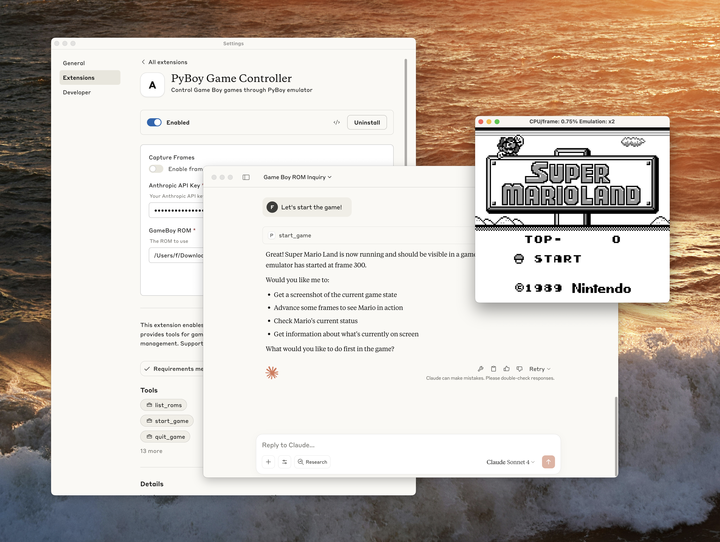 We can’t wait to see what you build. The same creativity that brought us thousands of MCP servers can now reach millions of users with just one click. Ready to share your MCP server? Submit your extension for review.
[
We can’t wait to see what you build. The same creativity that brought us thousands of MCP servers can now reach millions of users with just one click. Ready to share your MCP server? Submit your extension for review.
[
Looking to learn more?
Explore courses](https://anthropic.skilljar.com/)Key Takeaways
Notable Quotes
Claude Desktop Extensions now use the .mcpb (MCP Bundle) file extension instead of .dxt.Context: Discussing the update to the file extension used for Desktop Extensions.
Desktop Extensions solve these problems by bundling an entire MCP server into a single installable package.Context: Explaining the solution Desktop Extensions provide for installing MCP servers.
We ship Node.js with Claude Desktop, eliminating external dependencies.Context: Highlighting the built-in runtime feature of Claude Desktop to simplify user experience.
Related Topics
- [[topics/anthropic-api]]
- [[topics/prompt-engineering]]
- [[topics/software-development]]
Related Articles
A Model Context Protocol Server (MCP) for Microsoft Paint
Geoffrey Huntley · explanation · 64% similar
Code execution with MCP: Building more efficient agents
Anthropic Engineering · explanation · 64% similar
Claude Code overview
Anthropic Engineering · reference · 63% similar
Originally published at https://www.anthropic.com/engineering/desktop-extensions.