

Original: Anthropic Engineering · 02/02/2026
Summary
The future of AI agents is one where models work seamlessly across hundreds or thousands of tools. The future of AI agents is one where models work seamlessly across hundreds or thousands of tools. An IDE assistant that integrates git operations, file manipulation, package managers, testing frameworks, and deployment pipelines. An operations coordinator that connects Slack, GitHub, Google Drive,Key Insights
“The future of AI agents is one where models work seamlessly across hundreds or thousands of tools.” — Describing the vision for AI agents’ capabilities.
“Agents should discover and load tools on-demand, keeping only what’s relevant for the current task.” — Explaining the need for efficient tool management by AI agents.
“This represents an 85% reduction in token usage while maintaining access to your full tool library.” — Highlighting the efficiency gains from the Tool Search Tool feature.
Topics
Full Article
Introducing advanced tool use on the Claude Developer Platform
Author: Anthropic EngineeringPublished: 2026-02-02
Source: https://www.anthropic.com/engineering/advanced-tool-use
The future of AI agents is one where models work seamlessly across hundreds or thousands of tools. An IDE assistant that integrates git operations, file manipulation, package managers, testing frameworks, and deployment pipelines. An operations coordinator that connects Slack, GitHub, Google Drive, Jira, company databases, and dozens of MCP servers simultaneously. To build effective agents, they need to work with unlimited tool libraries without stuffing every definition into context upfront. Our blog article on using code execution with MCP discussed how tool results and definitions can sometimes consume 50,000+ tokens before an agent reads a request. Agents should discover and load tools on-demand, keeping only what’s relevant for the current task. Agents also need the ability to call tools from code. When using natural language tool calling, each invocation requires a full inference pass, and intermediate results pile up in context whether they’re useful or not. Code is a natural fit for orchestration logic, such as loops, conditionals, and data transformations. Agents need the flexibility to choose between code execution and inference based on the task at hand. Agents also need to learn correct tool usage from examples, not just schema definitions. JSON schemas define what’s structurally valid, but can’t express usage patterns: when to include optional parameters, which combinations make sense, or what conventions your API expects. Today, we’re releasing three features that make this possible:
- Tool Search Tool, which allows Claude to use search tools to access thousands of tools without consuming its context window
- Programmatic Tool Calling, which allows Claude to invoke tools in a code execution environment reducing the impact on the model’s context window
- Tool Use Examples, which provides a universal standard for demonstrating how to effectively use a given tool
Tool Search Tool
The challenge
MCP tool definitions provide important context, but as more servers connect, those tokens can add up. Consider a five-server setup:- GitHub: 35 tools (~26K tokens)
- Slack: 11 tools (~21K tokens)
- Sentry: 5 tools (~3K tokens)
- Grafana: 5 tools (~3K tokens)
- Splunk: 2 tools (~2K tokens)
notification-send-user vs. notification-send-channel.
Our solution
Instead of loading all tool definitions upfront, the Tool Search Tool discovers tools on-demand. Claude only sees the tools it actually needs for the current task.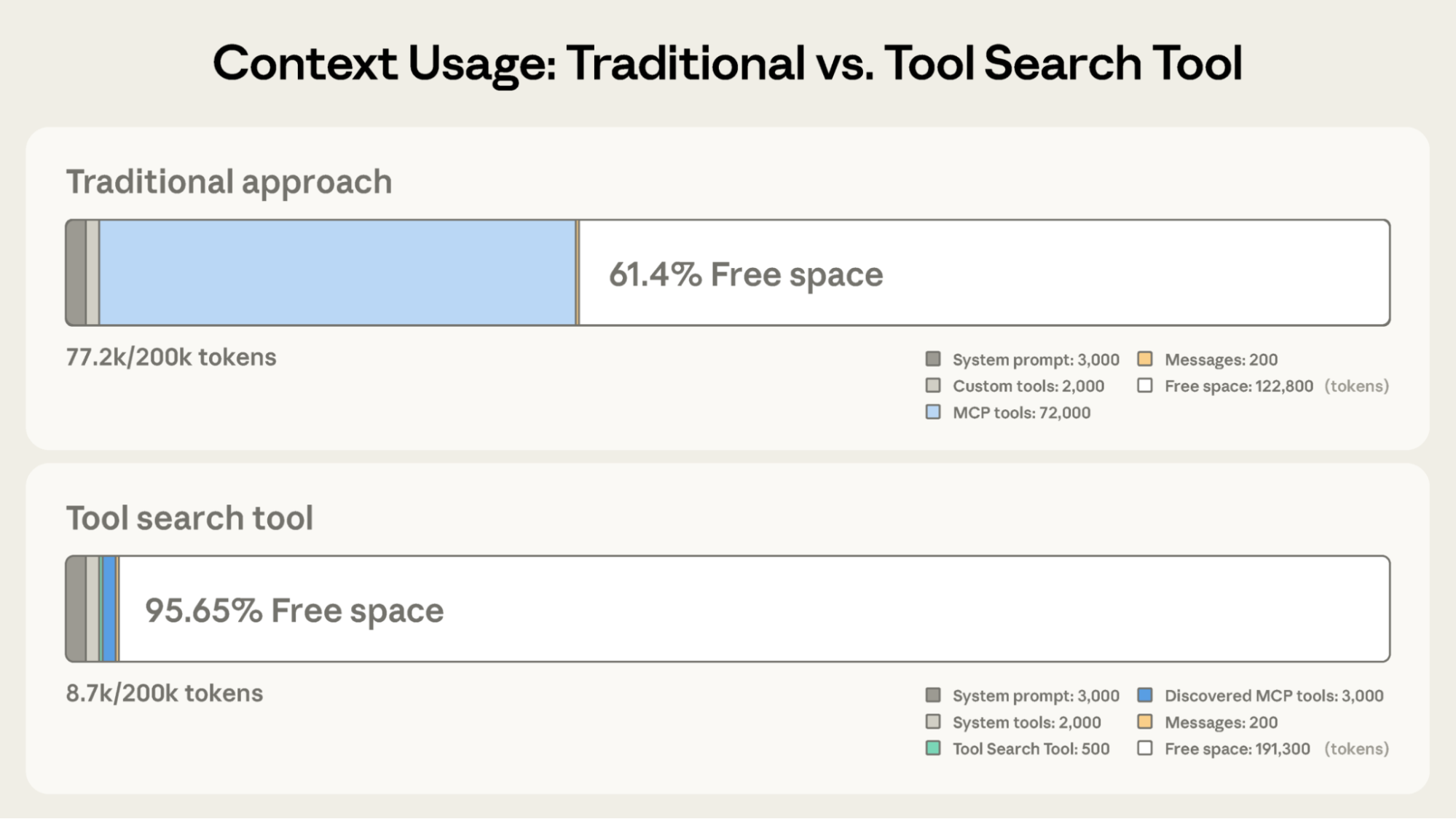 Tool Search Tool preserves 191,300 tokens of context compared to 122,800 with Claude’s traditional approach.
Traditional approach:
Tool Search Tool preserves 191,300 tokens of context compared to 122,800 with Claude’s traditional approach.
Traditional approach:
- All tool definitions loaded upfront (~72K tokens for 50+ MCP tools)
- Conversation history and system prompt compete for remaining space
- Total context consumption: ~77K tokens before any work begins
- Only the Tool Search Tool loaded upfront (~500 tokens)
- Tools discovered on-demand as needed (3-5 relevant tools, ~3K tokens)
- Total context consumption: ~8.7K tokens, preserving 95% of context window
How the Tool Search Tool works
The Tool Search Tool lets Claude dynamically discover tools instead of loading all definitions upfront. You provide all your tool definitions to the API, but mark tools withdefer_loading: true to make them discoverable on-demand. Deferred tools aren’t loaded into Claude’s context initially. Claude only sees the Tool Search Tool itself plus any tools with defer_loading: false (your most critical, frequently-used tools).
When Claude needs specific capabilities, it searches for relevant tools. The Tool Search Tool returns references to matching tools, which get expanded into full definitions in Claude’s context.
For example, if Claude needs to interact with GitHub, it searches for “github,” and only github.createPullRequest and github.listIssues get loaded—not your other 50+ tools from Slack, Jira, and Google Drive.
This way, Claude has access to your full tool library while only paying the token cost for tools it actually needs.
Prompt caching note: Tool Search Tool doesn’t break prompt caching because deferred tools are excluded from the initial prompt entirely. They’re only added to context after Claude searches for them, so your system prompt and core tool definitions remain cacheable.
Implementation:
When to use the Tool Search Tool
Like any architectural decision, enabling the Tool Search Tool involves trade-offs. The feature adds a search step before tool invocation, so it delivers the best ROI when the context savings and accuracy improvements outweigh additional latency. Use it when:- Tool definitions consuming >10K tokens
- Experiencing tool selection accuracy issues
- Building MCP-powered systems with multiple servers
- 10+ tools available
- Small tool library (<10 tools)
- All tools used frequently in every session
- Tool definitions are compact
Programmatic Tool Calling
The challenge
Traditional tool calling creates two fundamental problems as workflows become more complex:- Context pollution from intermediate results: When Claude analyzes a 10MB log file for error patterns, the entire file enters its context window, even though Claude only needs a summary of error frequencies. When fetching customer data across multiple tables, every record accumulates in context regardless of relevance. These intermediate results consume massive token budgets and can push important information out of the context window entirely.
- Inference overhead and manual synthesis: Each tool call requires a full model inference pass. After receiving results, Claude must “eyeball” the data to extract relevant information, reason about how pieces fit together, and decide what to do next—all through natural language processing. A five tool workflow means five inference passes plus Claude parsing each result, comparing values, and synthesizing conclusions. This is both slow and error-prone.
Our solution
Programmatic Tool Calling enables Claude to orchestrate tools through code rather than through individual API round-trips. Instead of Claude requesting tools one at a time with each result being returned to its context, Claude writes code that calls multiple tools, processes their outputs, and controls what information actually enters its context window. Claude excels at writing code and by letting it express orchestration logic in Python rather than through natural language tool invocations, you get more reliable, precise control flow. Loops, conditionals, data transformations, and error handling are all explicit in code rather than implicit in Claude’s reasoning.Example: Budget compliance check
Consider a common business task: “Which team members exceeded their Q3 travel budget?” You have three tools available:get_team_members(department)- Returns team member list with IDs and levelsget_expenses(user_id, quarter)- Returns expense line items for a userget_budget_by_level(level)- Returns budget limits for an employee level
- Fetch team members → 20 people
- For each person, fetch their Q3 expenses → 20 tool calls, each returning 50-100 line items (flights, hotels, meals, receipts)
- Fetch budget limits by employee level
- All of this enters Claude’s context: 2,000+ expense line items (50 KB+)
- Claude manually sums each person’s expenses, looks up their budget, compares expenses against budget limits
- More round-trips to the model, significant context consumption
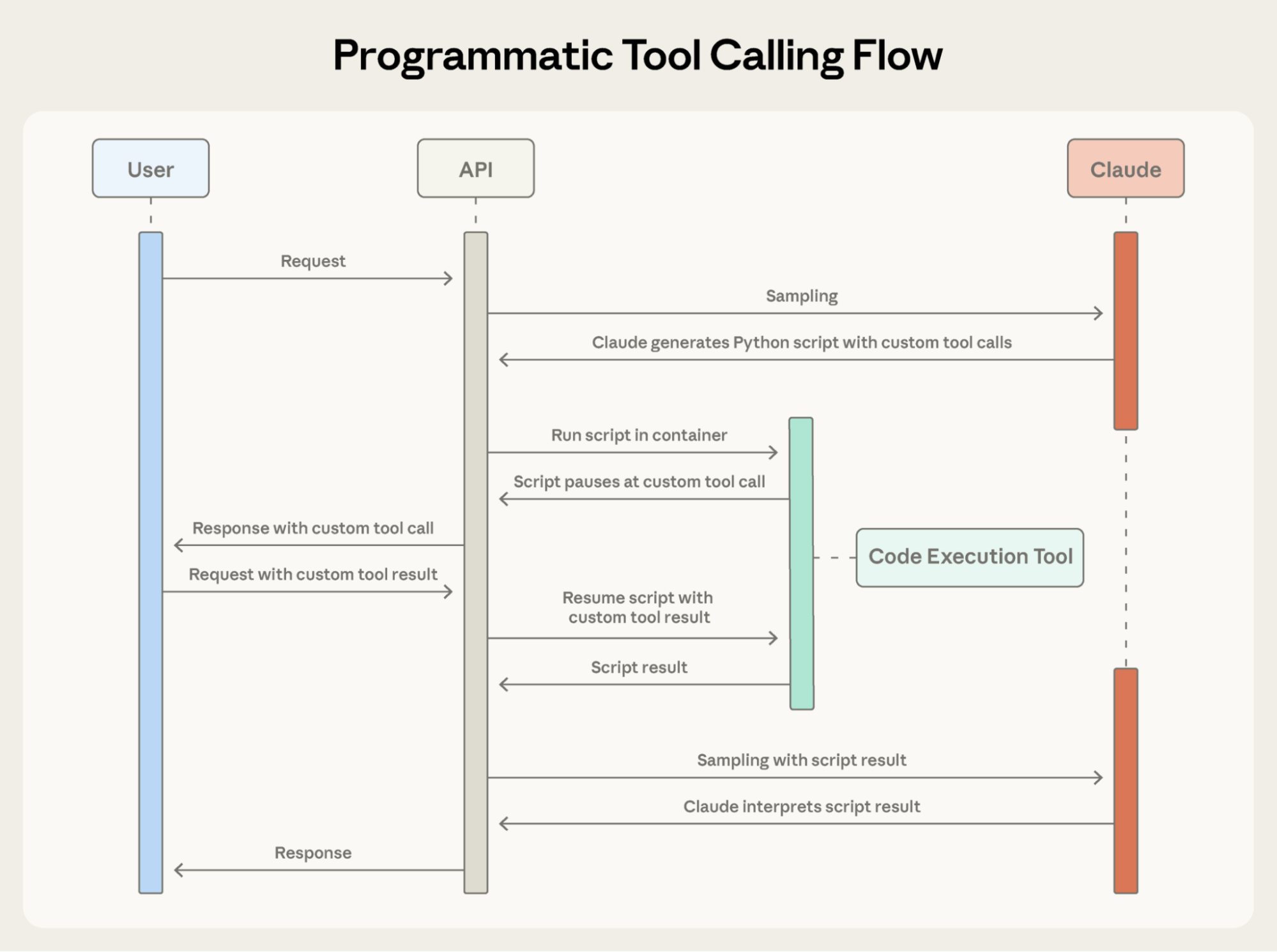 Programmatic Tool Calling enables Claude to orchestrate tools through code rather than through individual API round-trips, allowing for parallel tool execution.
Here’s what Claude’s orchestration code looks like for the budget compliance task:
Programmatic Tool Calling enables Claude to orchestrate tools through code rather than through individual API round-trips, allowing for parallel tool execution.
Here’s what Claude’s orchestration code looks like for the budget compliance task:
- Token savings: By keeping intermediate results out of Claude’s context, PTC dramatically reduces token consumption. Average usage dropped from 43,588 to 27,297 tokens, a 37% reduction on complex research tasks.
- Reduced latency: Each API round-trip requires model inference (hundreds of milliseconds to seconds). When Claude orchestrates 20+ tool calls in a single code block, you eliminate 19+ inference passes. The API handles tool execution without returning to the model each time.
- Improved accuracy: By writing explicit orchestration logic, Claude makes fewer errors than when juggling multiple tool results in natural language. Internal knowledge retrieval improved from 25.6% to 28.5%; GIA benchmarks from 46.5% to 51.2%.
How Programmatic Tool Calling works
1. Mark tools as callable from code
Add code_execution to tools, and set allowed_callers to opt-in tools for programmatic execution:2. Claude writes orchestration code
Instead of requesting tools one at a time, Claude generates Python code:3. Tools execute without hitting Claude’s context
When the code calls get_expenses(), you receive a tool request with a caller field:4. Only final output enters context
When the code finishes running, only the results of the code are returned to Claude:When to use Programmatic Tool Calling
Programmatic Tool Calling adds a code execution step to your workflow. This extra overhead pays off when the token savings, latency improvements, and accuracy gains are substantial. Most beneficial when:- Processing large datasets where you only need aggregates or summaries
- Running multi-step workflows with three or more dependent tool calls
- Filtering, sorting, or transforming tool results before Claude sees them
- Handling tasks where intermediate data shouldn’t influence Claude’s reasoning
- Running parallel operations across many items (checking 50 endpoints, for example)
- Making simple single-tool invocations
- Working on tasks where Claude should see and reason about all intermediate results
- Running quick lookups with small responses
Tool Use Examples
The challenge
JSON Schema excels at defining structure–types, required fields, allowed enums–but it can’t express usage patterns: when to include optional parameters, which combinations make sense, or what conventions your API expects. Consider a support ticket API:- Format ambiguity: Should
due_dateuse “2024-11-06”, “Nov 6, 2024”, or “2024-11-06T00:00:00Z”? - ID conventions: Is
reporter.ida UUID, “USR-12345”, or just “12345”? - Nested structure usage: When should Claude populate
reporter.contact? - Parameter correlations: How do
escalation.levelandescalation.sla_hoursrelate to priority?
Our solution
Tool Use Examples let you provide sample tool calls directly in your tool definitions. Instead of relying on schema alone, you show Claude concrete usage patterns:- Format conventions: Dates use YYYY-MM-DD, user IDs follow USR-XXXXX, labels use kebab-case
- Nested structure patterns: How to construct the reporter object with its nested contact object
- Optional parameter correlations: Critical bugs have full contact info + escalation with tight SLAs; feature requests have reporter but no contact/escalation; internal tasks have title only
When to use Tool Use Examples
Tool Use Examples add tokens to your tool definitions, so they’re most valuable when accuracy improvements outweigh the additional cost. Most beneficial when:- Complex nested structures where valid JSON doesn’t imply correct usage
- Tools with many optional parameters and inclusion patterns matter
- APIs with domain-specific conventions not captured in schemas
- Similar tools where examples clarify which one to use (e.g.,
create_ticketvscreate_incident)
- Simple single-parameter tools with obvious usage
- Standard formats like URLs or emails that Claude already understands
- Validation concerns better handled by JSON Schema constraints
Best practices
Building agents that take real-world actions means handling scale, complexity, and precision simultaneously. These three features work together to solve different bottlenecks in tool use workflows. Here’s how to combine them effectively.Layer features strategically
Not every agent needs to use all three features for a given task. Start with your biggest bottleneck:- Context bloat from tool definitions → Tool Search Tool
- Large intermediate results polluting context → Programmatic Tool Calling
- Parameter errors and malformed calls → Tool Use Examples
Set up Tool Search Tool for better discovery
Tool search matches against names and descriptions, so clear, descriptive definitions improve discovery accuracy.Set up Programmatic Tool Calling for correct execution
Since Claude writes code to parse tool outputs, document return formats clearly. This helps Claude write correct parsing logic:- Tools that can run in parallel (independent operations)
- Operations safe to retry (idempotent)
Set up Tool Use Examples for parameter accuracy
Craft examples for behavioral clarity:- Use realistic data (real city names, plausible prices, not “string” or “value”)
- Show variety with minimal, partial, and full specification patterns
- Keep it concise: 1-5 examples per tool
- Focus on ambiguity (only add examples where correct usage isn’t obvious from schema)
Getting started
These features are available in beta. To enable them, add the beta header and include the tools you need:- Documentation and cookbook for Tool Search Tool
- Documentation and cookbook for Programmatic Tool Calling
- Documentation for Tool Use Examples
Acknowledgements
Written by Bin Wu, with contributions from Adam Jones, Artur Renault, Henry Tay, Jake Noble, Nathan McCandlish, Noah Picard, Sam Jiang, and the Claude Developer Platform team. This work builds on foundational research by Chris Gorgolewski, Daniel Jiang, Jeremy Fox and Mike Lambert. We also drew inspiration from across the AI ecosystem, including Joel Pobar’s LLMVM, Cloudflare’s Code Mode and Code Execution as MCP. Special thanks to Andy Schumeister, Hamish Kerr, Keir Bradwell, Matt Bleifer and Molly Vorwerck for their support.Key Takeaways
Notable Quotes
The future of AI agents is one where models work seamlessly across hundreds or thousands of tools.Context: Describing the vision for AI agents’ capabilities.
Agents should discover and load tools on-demand, keeping only what’s relevant for the current task.Context: Explaining the need for efficient tool management by AI agents.
This represents an 85% reduction in token usage while maintaining access to your full tool library.Context: Highlighting the efficiency gains from the Tool Search Tool feature.
Related Topics
- [[topics/anthropic-api]]
- [[topics/ai-agents]]
- [[topics/prompt-engineering]]
Related Articles
Writing effective tools for agents — with agents
Anthropic Engineering · how-to · 73% similar
HowtoBuildanAgent
Ampcode · tutorial · 70% similar
Effective context engineering for AI agents
Anthropic Engineering · explanation · 66% similar
Originally published at https://www.anthropic.com/engineering/advanced-tool-use.