

Original: Anthropic Engineering · 21/02/2026
Summary
A new tool that improves Claude’s complex problem-solving performanceTopics
Full Article
The “think” tool: Enabling Claude to stop and think in complex tool use situations
Author: Anthropic EngineeringPublished: 2026-02-21
Source: https://www.anthropic.com/engineering/claude-think-tool
Engineering at Anthropic
The “think” tool: Enabling Claude to stop and think in complex tool use situations
Published Mar 20, 2025 A new tool that improves Claude’s complex problem-solving performance- Extended thinking update
What is the “think” tool?
With the “think” tool, we’re giving Claude the ability to include an additional thinking step—complete with its own designated space—as part of getting to its final answer. While it sounds similar to extended thinking, it’s a different concept. Extended thinking is all about what Claude does before it starts generating a response. With extended thinking, Claude deeply considers and iterates on its plan before taking action. The “think” tool is for Claude, once it starts generating a response, to add a step to stop and think about whether it has all the information it needs to move forward. This is particularly helpful when performing long chains of tool calls or in long multi-step conversations with the user. This makes the “think” tool more suitable for cases where Claude does not have all the information needed to formulate its response from the user query alone, and where it needs to process external information (e.g. information in tool call results). The reasoning Claude performs with the “think” tool is less comprehensive than what can be obtained with extended thinking, and is more focused on new information that the model discovers. We recommend using extended thinking for simpler tool use scenarios like non-sequential tool calls or straightforward instruction following. Extended thinking is also useful for use cases, like coding, math, and physics, when you don’t need Claude to call tools. The “think” tool is better suited for when Claude needs to call complex tools, analyze tool outputs carefully in long chains of tool calls, navigate policy-heavy environments with detailed guidelines, or make sequential decisions where each step builds on previous ones and mistakes are costly. Here’s a sample implementation using the standard tool specification format that comes from τ-Bench:Performance on τ-Bench
We evaluated the “think” tool using τ-bench (tau-bench), a comprehensive benchmark designed to test a model’s ability to use tools in realistic customer service scenarios, where the “think” tool is part of the evaluation’s standard environment. τ-bench evaluates Claude’s ability to:- Navigate realistic conversations with simulated users
- Follow complex customer service agent policy guidelines consistently
- Use a variety of tools to access and manipulate the environment database
Performance Analysis
Our evaluation compared several different configurations:- Baseline (no “think” tool, no extended thinking mode)
- Extended thinking mode alone
- “Think” tool alone
- “Think” tool with optimized prompt (for airline domain)
- Airline domain: The “think” tool with an optimized prompt achieved 0.570 on the pass^1 metric, compared to just 0.370 for the baseline—a 54% relative improvement;
- Retail domain: The “think” tool alone achieves 0.812, compared to 0.783 for the baseline.
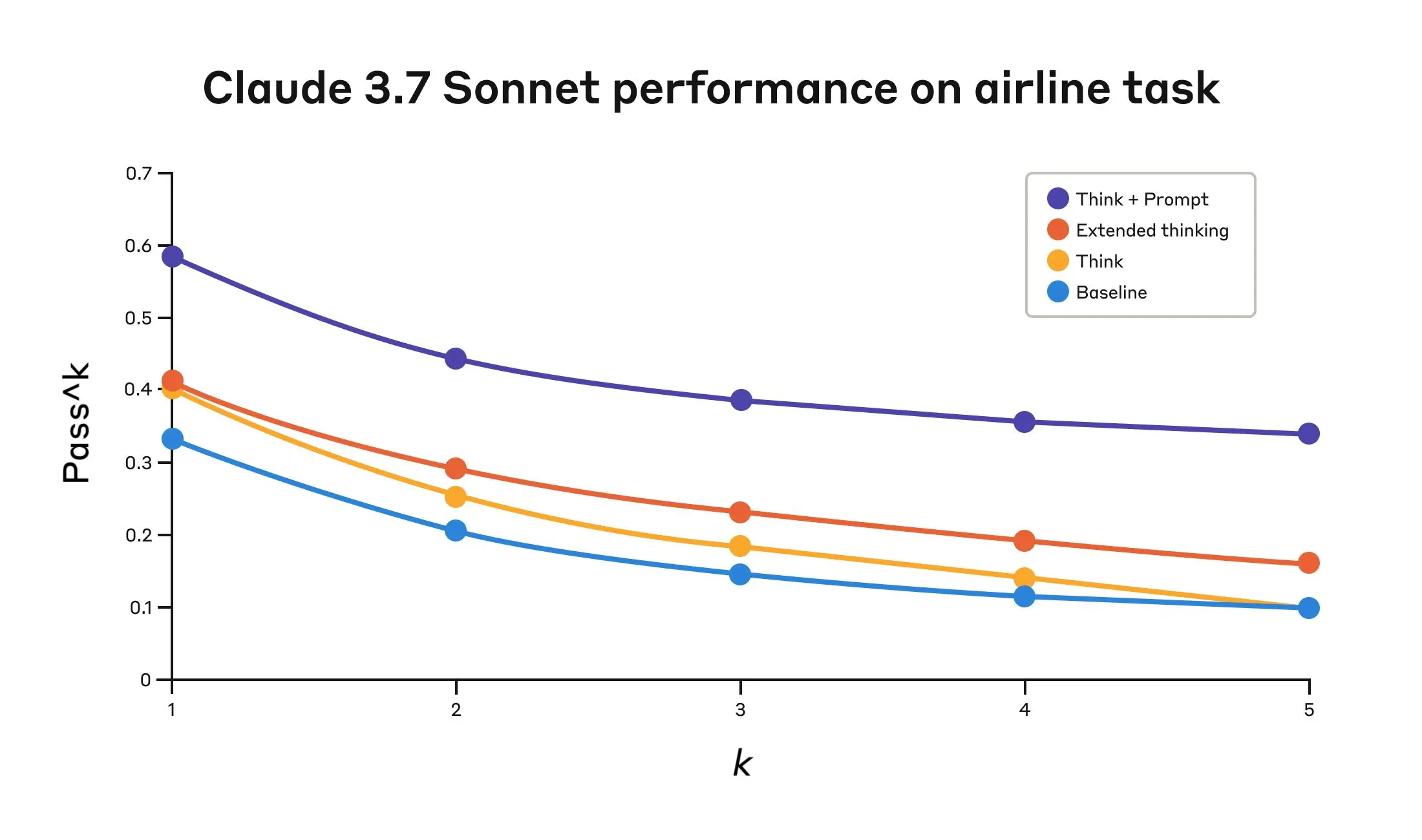 Claude 3.7 Sonnet’s performance on the “airline” domain of the Tau-Bench eval under four different configurations.
Claude 3.7 Sonnet’s performance on the “Airline” domain of the Tau-Bench eval
Claude 3.7 Sonnet’s performance on the “airline” domain of the Tau-Bench eval under four different configurations.
Claude 3.7 Sonnet’s performance on the “Airline” domain of the Tau-Bench eval
| Configuration | k=1 | k=2 | k=3 | k=4 | k=5 |
|---|---|---|---|---|---|
| ”Think” + Prompt | 0.584 | 0.444 | 0.384 | 0.356 | 0.340 |
| ”Think” | 0.404 | 0.254 | 0.186 | 0.140 | 0.100 |
| Extended thinking | 0.412 | 0.290 | 0.232 | 0.192 | 0.160 |
| Baseline | 0.332 | 0.206 | 0.148 | 0.116 | 0.100 |
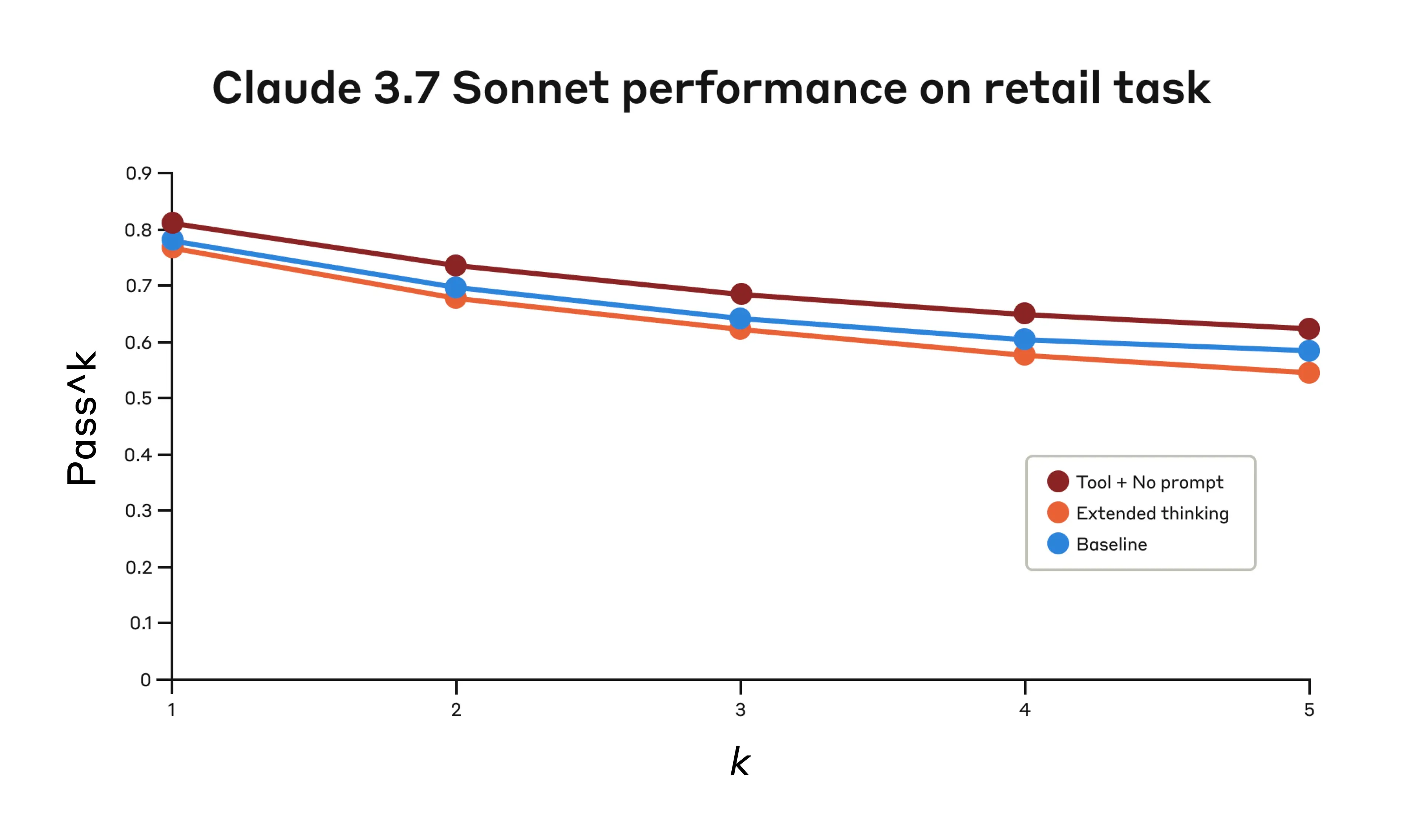 Performance of Claude 3.7 Sonnet on the “retail” domain of the Tau-Bench eval under three different configurations.
Claude 3.7 Sonnet’s performance on the “Retail” domain of the Tau-Bench eval
Performance of Claude 3.7 Sonnet on the “retail” domain of the Tau-Bench eval under three different configurations.
Claude 3.7 Sonnet’s performance on the “Retail” domain of the Tau-Bench eval
| Configuration | k=1 | k=2 | k=3 | k=4 | k=5 |
|---|---|---|---|---|---|
| ”Think” + no prompt | 0.812 | 0.735 | 0.685 | 0.650 | 0.626 |
| Extended thinking | 0.770 | 0.681 | 0.623 | 0.581 | 0.548 |
| Baseline | 0.783 | 0.695 | 0.643 | 0.607 | 0.583 |
Key Insights from τ-Bench Analysis
Our detailed analysis revealed several patterns that can help you implement the “think” tool effectively:- Prompting matters significantly on difficult domains. Simply making the “think” tool available might improve performance somewhat, but pairing it with optimized prompting yielded dramatically better results for difficult domains. However, easier domains may benefit from simply having access to “think.”
- Improved consistency across trials. The improvements from using “think” were maintained for pass^k up to k=5, indicating that the tool helped Claude handle edge cases and unusual scenarios more effectively.
Performance on SWE-Bench
A similar “think” tool was added to our SWE-bench setup when evaluating Claude 3.7 Sonnet, contributing to the achieved state-of-the-art score of 0.623. The adapted “think” tool definition is given below:When to use the “think” tool
Based on these evaluation results, we’ve identified specific scenarios where Claude benefits most from the “think” tool:- Tool output analysis. When Claude needs to carefully process the output of previous tool calls before acting and might need to backtrack in its approach;
- Policy-heavy environments. When Claude needs to follow detailed guidelines and verify compliance; and
- Sequential decision making. When each action builds on previous ones and mistakes are costly (often found in multi-step domains).
Implementation best practices
To get the most out of the “think” tool with Claude, we recommend the following implementation practices based on our τ-bench experiments.1. Strategic prompting with domain-specific examples
The most effective approach is to provide clear instructions on when and how to use the “think” tool, such as the one used for the τ-bench airline domain. Providing examples tailored to your specific use case significantly improves how effectively the model uses the “think” tool:- The level of detail expected in the reasoning process;
- How to break down complex instructions into actionable steps;
- Decision trees for handling common scenarios; and
- How to check if all necessary information has been collected.
2. Place complex guidance in the system prompt
We found that, when they were long and/or complex, including instructions about the “think” tool in the system prompt was more effective than placing them in the tool description itself. This approach provides broader context and helps the model better integrate the thinking process into its overall behavior.When not to use the “think” tool
Whereas the “think” tool can offer substantial improvements, it is not applicable to all tool use use cases, and does come at the cost of increased prompt length and output tokens. Specifically, we have found the “think” tool does not offer any improvements in the following use cases:- Non-sequential tool calls. If Claude only needs to make a single tool call or multiple parallel calls to complete a task, there is unlikely to be any improvements from adding in “think.”
- Simple instruction following. When there are not many constraints to which Claude needs to adhere, and its default behaviour is good enough, there are unlikely to be gains from additional “think”-ing.
Getting started
The “think” tool is a straightforward addition to your Claude implementation that can yield meaningful improvements in just a few steps:- Test with agentic tool use scenarios. Start with challenging use cases—ones where Claude currently struggles with policy compliance or complex reasoning in long tool call chains.
- Add the tool definition. Implement a “think” tool customized to your domain. It requires minimal code but enables more structured reasoning. Also consider including instructions on when and how to use the tool, with examples relevant to your domain to the system prompt.
- Monitor and refine. Watch how Claude uses the tool in practice, and adjust your prompts to encourage more effective thinking patterns.
Conclusion
Our research has demonstrated that the “think” tool can significantly enhance Claude 3.7 Sonnet’s performance1 on complex tasks requiring policy adherence and reasoning in long chains of tool calls. “Think” is not a one-size-fits-all solution, but it offers substantial benefits for the correct use cases, all with minimal implementation complexity. We look forward to seeing how you’ll use the “think” tool to build more capable, reliable, and transparent AI systems with Claude.- While our τ-Bench results focused on the improvement of Claude 3.7 Sonnet with the “think” tool, our experiments show Claude 3.5 Sonnet (New) is also able to achieve performance gains with the same configuration as 3.7 Sonnet, indicating that this improvement generalizes to other Claude models as well.
Key Takeaways
Related Topics
- [[topics/ai]]
- [[topics/technology]]
Related Articles
Writing effective tools for agents — with agents
Anthropic Engineering · how-to · 72% similar
Raising the bar on SWE-bench Verified with Claude 3.5 Sonnet
Anthropic Engineering · explanation · 71% similar
Designing AI-resistant technical evaluations
Anthropic Engineering · explanation · 70% similar
Originally published at https://www.anthropic.com/engineering/claude-think-tool.